
Independent Business Intelligence Consulting
Turn your data into decisions leaders act on.
Senior BI leadership for teams whose data is scattered, slow, or hard to trust. I set data and AI strategy, build dashboards executives use, automate the reporting behind them, and support your team long after launch.
Since 2005
Working in data, from analyst to BI Manager
Diverse, high-performing teams
Led analysts, data engineers, and BI developers
Power BI, Fabric, Databricks
The Microsoft data stack, end to end
Services
My work falls into four areas, from setting data and AI direction to keeping reporting running. Most clients start with one of the featured packages below.
01
Strategy & Leadership
Data and AI strategy, readiness assessments, governance, and implementation roadmaps.
- Data strategy
- Fractional BI leadership
- KPI definition
- Governance foundations
- AI readiness & roadmaps
02
Dashboards & Insights
Decision-focused reporting, AI-assisted insights, and performance measurement for AI solutions.
- Power BI builds
- Dashboard redesign
- Executive reporting
- Analytics storytelling
- AI performance measurement
03
Data & Automation
Reliable data workflows, AI-enabled automation, and practical business tools.
- Reporting automation
- Data preparation
- Data quality
- Fabric & Databricks planning
- AI-enabled automation
04
Support & Enablement
Ongoing help so your team can keep the work running.
- Managed BI support
- Training
- Documentation
- Analytics office hours
Featured packages
Defined starting points, each with a clear deliverable and a handoff your team can run with.
Strategy & Leadership
Package 01
Data Strategy
A clear plan for your data: what to measure, who owns it, and what to build first, so analytics spending goes where it pays off.
- Stakeholder interviews and a current-state review
- KPI definitions with owners, formulas, and sources
- A prioritized roadmap and build-ready backlog
Best for: organizations about to invest in analytics but unsure what to build, or whose departments report conflicting numbers.
Package 02
Fractional BI Leadership
Senior analytics leadership without a full-time hire, offered as a monthly retainer sized to your needs.
- Weekly leadership meetings and backlog prioritization
- An analytics roadmap, refreshed every quarter
- Monthly executive updates and oversight of your team or vendors
Best for: growing companies that need a BI leader but aren’t ready to hire one full time.
Dashboards & Insights
Package 03
Power BI Audit & Optimization
A structured review of your reports, semantic models, and refresh pipeline, ending in a prioritized plan to make them faster, leaner, and easier to trust.
- Data model, DAX, and refresh performance review
- Report design, usability, and governance check
- Findings report with prioritized fixes and quick wins
Best for: reports that load slowly, disagree with each other, or only one person knows how to maintain.
Package 04
Executive Data Storytelling
Dense dashboards, reshaped into a clear story for leadership: the few measures that matter, what changed, and what to do about it.
- KPI focus and audience mapping with stakeholders
- Executive-ready report pages and briefing layout
- Storytelling guidelines your analysts can reuse
Best for: leaders who have dashboards but still ask for the slide deck.
Package 05
Power BI Dashboard Build
A new Power BI dashboard built on the data you already have, from cleanup and modeling to a published report your leadership team will use.
- Discovery of the decisions, audience, and KPIs it supports
- Power Query cleanup, star-schema model, and DAX measures
- Published report with documentation and a walkthrough
Best for: teams with data in spreadsheets, SQL, SharePoint, or Fabric, but no dashboard leaders rely on.
AI offers
Package 06
AI Opportunity & Readiness Assessment
Decide which AI ideas are worth pursuing, and what your data, governance, and licensing need before you start.
- Stakeholder interviews and up to 10 candidate use cases
- Each use case scored on value, feasibility, data readiness, and risk
- A 90-day roadmap, responsible-use guidelines, and one or two pilot picks
Best for: leadership teams under pressure to adopt AI without a clear place to start.
Package 07
AI Solution Discovery & Pilot
Validate one bounded use case with real users before you commit to a production build.
- Discovery of the use case, data, users, and success measures
- A working pilot in your own Microsoft tenant for a small user group
- Accuracy testing, user feedback, and a go, extend, or stop recommendation
Best for: teams with a promising AI idea that needs proof before a larger investment.
Package 08
AI Performance & Value Dashboard
A Power BI dashboard that shows whether your AI solutions are paying off: quality, adoption, cost, and business outcomes.
- Agreed definitions for quality, adoption, cost, and value
- Data drawn from usage logs, user feedback, and licensing or consumption
- A published report with targets and a monthly review routine
Best for: organizations running copilots, chatbots, or agents without a clear view of what they return.
Need something from another area, or not sure where to start? Every engagement begins with a 30-minute call.
How an engagement works
Fixed scope, regular check-ins, and documentation built in, so the work keeps paying off after I’m gone.
01
Discovery call
A conversation about your reporting, who relies on it, and the decisions it needs to support. You’ll leave knowing which engagement fits, if any.
02
Scope and build
A written scope, timeline, and deliverables, then hands-on work in your Power BI, Fabric, or Databricks environment.
03
Handoff
A walkthrough with your team, documentation of what changed and why, and recommended next steps, so you can maintain it without me.
Case studies
Four anonymized engagements, from measuring capacity and automating onboarding to redesigning dashboards leaders actually use.
Case study 01
An engagement dashboard that showed leaders where to act
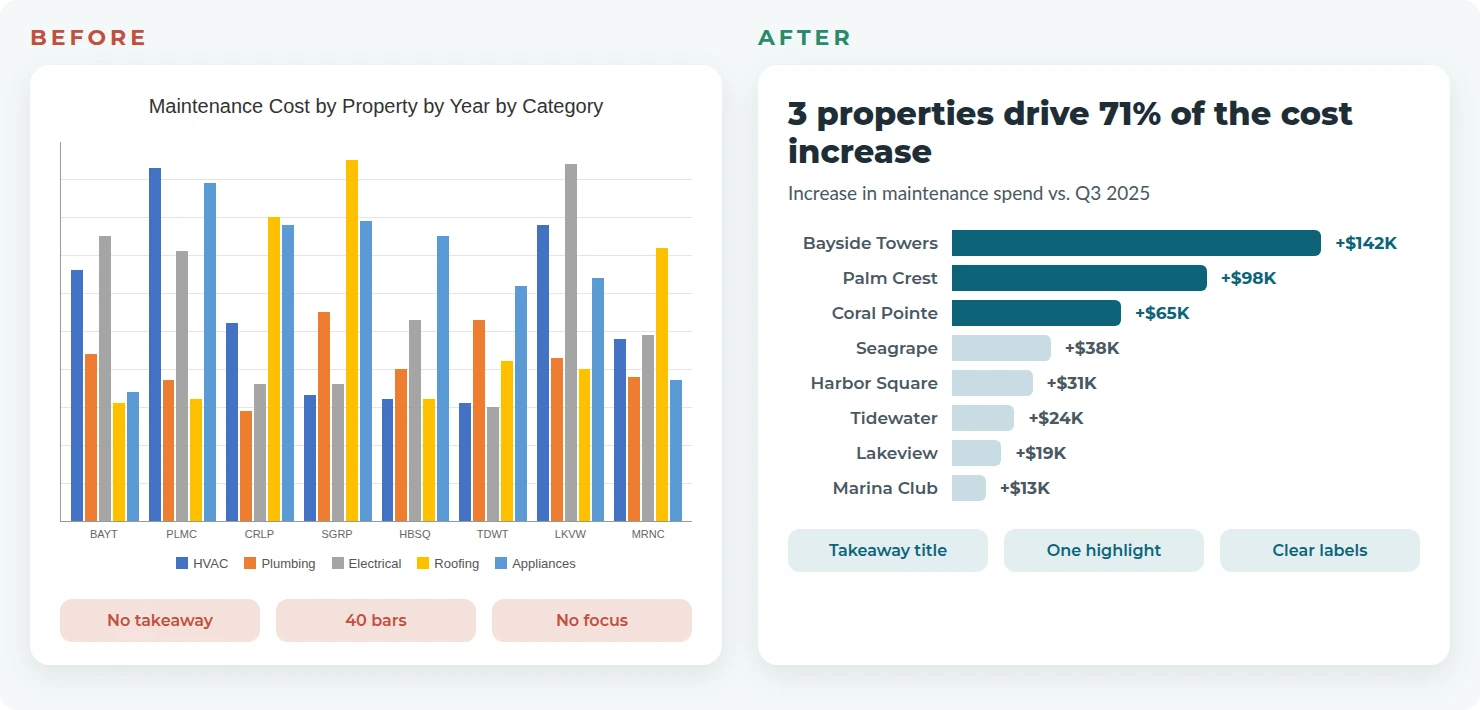
Survey results are only useful if leaders can see where to act. This dashboard turned annual and pulse survey results into a view executives could use by market, region, and department.
The challenge
A large property-management organization ran annual engagement and pulse surveys, but leaders had no clear way to see where satisfaction was strong or slipping.
What was built
A Power BI dashboard of satisfaction measures by market, region, and department, designed for senior executives rather than analysts.
The result
Executives used it to focus improvement efforts where they mattered most and to support employee retention.

About
Meet Daphne Champagne
Founder and principal consultant, Winged Data LLC
I’ve worked in data since 2005, growing from data analyst to Business Intelligence Manager. In that role I led a 20+ person team of analysts, data engineers, and BI developers, and saw firsthand how faster, clearer reporting changes the way leaders make decisions.
When you work with Winged Data, you work directly with me: someone who has owned BI end to end, from the data model to the conversation with leadership. It’s senior expertise without a full-time hire. I’m based in Northern Colorado and work with clients remotely.
Let’s talk about your data.
Tell me what’s slowing your reporting down. In one 30-minute call, we’ll work out where you need help, whether that’s strategy, dashboards, data and automation, or ongoing support. Pick a time that works for you.